


Once you register for Snap Preview AnywhereTM you receive a code which you need to add to your template.
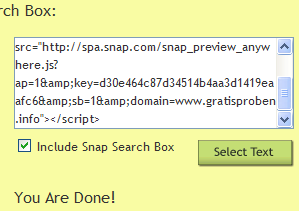
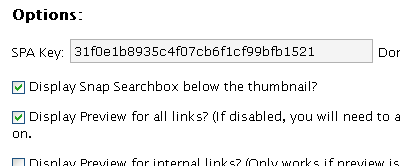
Within this code is a key= followed by a 32-character key. e.g. on this blog, the 32-character key is 31f0e1b8935c4f07cb6f1cf99bfb1521.
This key is unique to your site and hence you need to register separately for each of your sites.
Once you get the 32-bit key you will need to enter this into the Options page in WP-Admin.





Pls resend us the spa key.
I don’t generate the SPA key. Try to register on the Snap site.
can you tell me how to get the SPA key for my own blog? I visited snap.com but couldn’t find where to register for it
Signup for SPA
I installed it, but have a bad quality of link icon 🙁
Is this service from snap.com totally free ? Or are there limitations ?
Trying to avoid a JavaScript solution – too many mashups .
Is there any free linux command-line tool like HTML To Image ? khtml2png exists but it doesnt seem to be updated and moreover its not stand-alone.
It is totally free.
I use your apps on my webblog.
thany you it’s very useful plugin’s bro
Joule